Key Advantages and Disadvantages of Cloud-Based Accounting Services

Cloud-based accounting software has been available in Latvia for several years and has become a regular part of daily work for many companies. Extensive use over time provides enough information to conclude the true advantages and disadvantages of cloud-based accounting solutions.
Advantages
Remote Work Opportunities
More and more companies are enabling their employees to work remotely, and employees highly value working outside the office. They can save commuting time and accomplish more on days without scheduled in-person meetings with colleagues, clients, or partners. Several studies have shown that employees who can occasionally work remotely are more productive, take fewer sick days, and experience less stress.
Cloud-based accounting solutions provide such remote work opportunities. As long as there is an internet connection, most systems can be accessed from both computers and mobile devices, including phones, using a standard web browser. This is especially important for business owners, as they can access accounting data and obtain up-to-date information at any time. This is useful, for example, when meeting with partners to discuss participation in a new project.
Accountants no longer need to stay late at the office during report submission periods. If something is not completed during the day, they can log into the system from home during their free time to finish their tasks.
Easier Work for Accountants and Accounting Service Providers
The market for accounting service providers in Latvia is quite broad. There are self-employed accountants offering services to a few companies, as well as large accounting consultancy and audit firms that cater to the accounting and financial needs of many businesses. There are also in-house accountants who serve multiple companies within a group and its branches.
Cloud services offer special advantages to accounting service providers and accountants serving multiple companies, as they perfectly support this business model. Cloud services allow accounting service recipients to access their database, view, and input company accounting data (invoices, bills, timesheets, etc.). Using this model, the daily tasks of accounting service providers become more efficient, as most information can be entered into the system by the client themselves. Accounting service providers can offer greater added value by providing advice on bookkeeping and financial optimization, as well as other highly qualified services.
The security of clients' financial data is critically important for accounting service providers, which is why they appreciate the opportunity to entrust this responsibility to professionals and not worry about complications that may arise from storing client data on their own computers or servers.
Cloud-based accounting services also significantly reduce IT costs for maintaining quality servers and IT infrastructure. These costs are directly and transparently attributable to each client, allowing precise planning of business models and profits generated by each client.
More Opportunities for Managers and Accountants
Accounting and financial management are closely tied to company executives and middle managers. To make the right decisions, managers need up-to-date financial information. In the past, financial information was prepared by accountants upon request, but now managers can view all the necessary data in the cloud solution, even on their smartphones. For example, they can quickly view information about the company's turnover and profit or expected revenues and overdue payments.
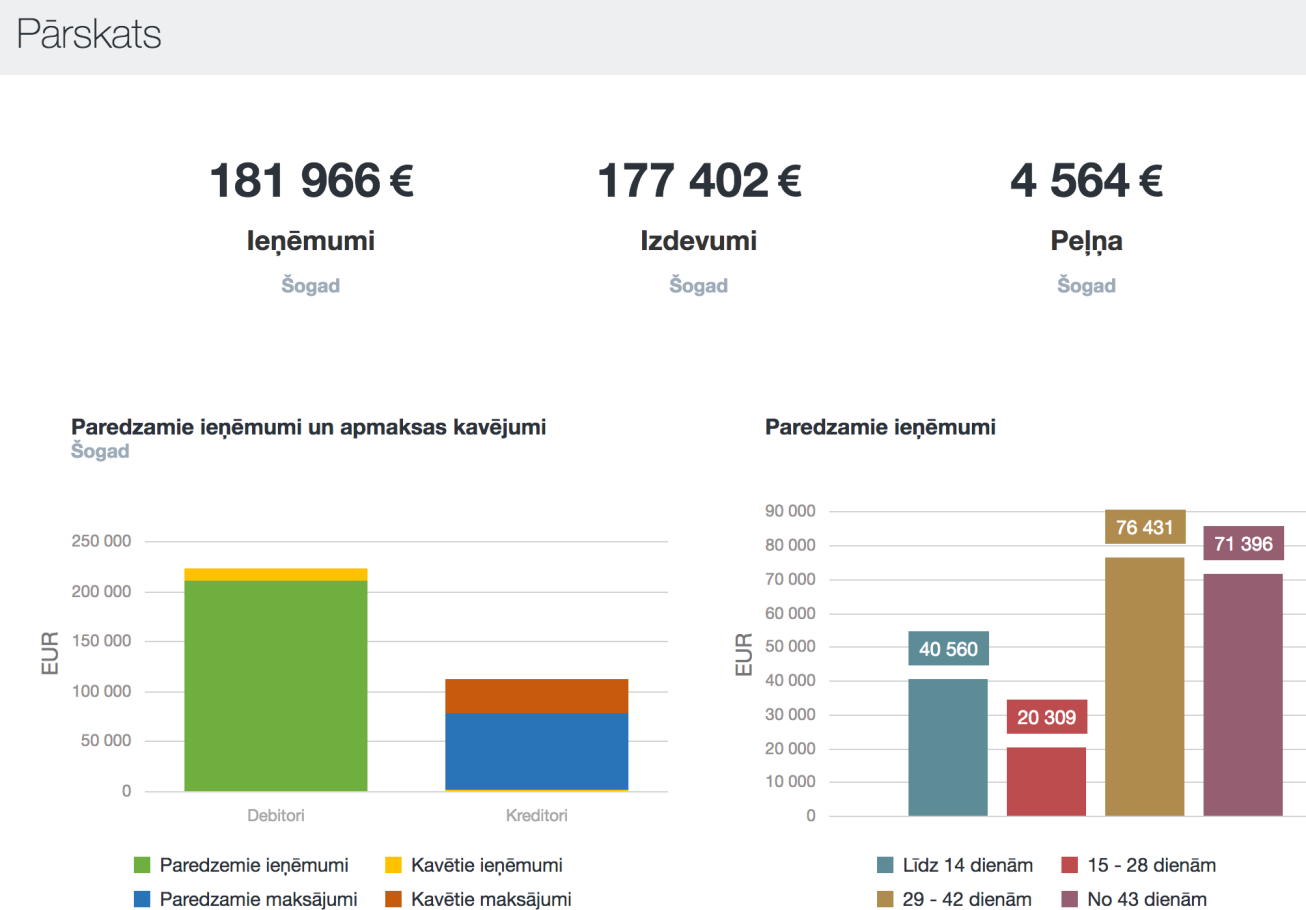
Managers often need specific reports that reflect particular required information. For instance, unpaid invoices for the current month, the number of product units sold this week, employee efficiency reports, etc. In such cases, a report is prepared, and the manager can view this report updated with always-current data in the future. This functionality is also very useful for accounting service providers, who can prepare reports for their clients, and clients can view them in their web browsers on computers, smartphones, or tablets, significantly enhancing the value and competitiveness of the provided service.
Example: A manager regularly needs a report on product stock levels in each warehouse on a specific day. An accountant can create such a report in the accounting system, and it will be available in the company's cloud-based management solution.
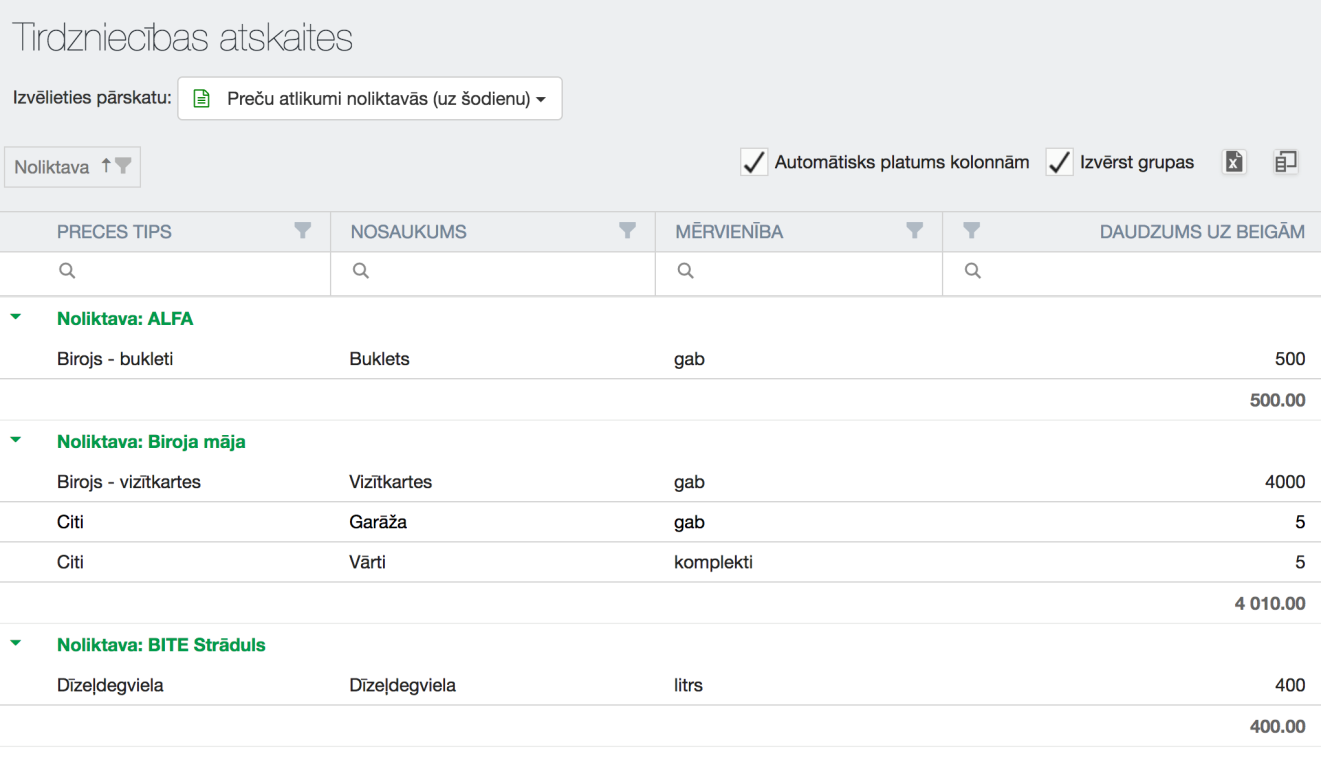
Cloud services that provide such management reporting capabilities make the work and communication between accountants and managers more efficient and positive, allowing everyone involved to dedicate more time to essential tasks.
Disadvantages
Unified Work Principles and Security
Cloud solutions pose the biggest challenge for accountants who are used to maintaining a unique—understood only by them—order in the world of numbers. They know where to find specific data and can locate it quickly, but anyone else in this "order" feels like they are lost in a dense forest.
In the cloud, company data is accessible at any time to any employee with a username and password. Therefore, everyone must ensure that the correct data is in the right places in the system and that nothing is accidentally deleted.
The second important aspect is security. While cloud service providers use various systems to protect clients from unauthorized access to their databases, clients must also take greater responsibility for the security of their passwords and adhere to digital hygiene to prevent unauthorized individuals from accessing financial data.
We offer several recommendations for ensuring password security.
- Choose a password consisting of uppercase and lowercase letters, numbers, and symbols.
- Do not use the same password for multiple cloud services.
- Change your password regularly—at least once every three months.
- Do not write down your password or place these notes in accessible locations.
- Never disclose your password to others.
- Ensure your computer's security by running the latest antivirus software; do not install software from unknown sources or visit questionable websites.
- Create your own password creation system or use a password management program.
Example: You can create your own system so that any internet resource's password is generated based on a specific principle. Password = the first three letters of the resource's address + the current year minus 2 years + the first 2 uppercase letters of the current month + your pet's name + a string of symbols $%. Thus, the current password for a Facebook account would be: fac2015OKmuris$%. In January of the next year, the password would be: fac2016JAmuris$%.
The Cloud Is Not Always the Most Suitable Solution
Although cloud service providers claim that the cloud is the only solution for any IT system, this is not entirely true. Companies' needs and capabilities vary greatly, as do the systems they use. Therefore, when meeting with cloud service providers, all these nuances and requirements must be discussed.
Sometimes company offices are located in areas where a quality internet connection is unavailable or unstable. In such cases, using cloud services may cause more problems than benefits. Additionally, companies often already have accounting and enterprise resource planning systems that are not available as cloud solutions. In such cases, it is necessary to evaluate whether transitioning to cloud-based accounting services will pay off in the long term.
If a company has already invested significant resources and effort into developing its IT infrastructure, then a thorough evaluation is needed to determine whether a complete transition to cloud services is necessary. A hybrid solution is also possible, where some data is stored on company servers and some in the cloud. However, long-term considerations are essential, as every data server has a designated lifespan. The most important thing is to carefully evaluate, understand all risks and benefits, and make an informed decision.
Choosing a Low-Quality Product
Entrusting your company's data to another company can be a psychologically challenging step. The main aspect here is trust in the cloud service provider. There are several aspects to consider when choosing a cloud service provider, and the following are questions to ask the provider.
- Experience and market presence. The longer the provider has been in the market, the higher the likelihood that the service has overcome initial issues and operates stably. Long-term market presence also indicates the ability to attract and retain professional staff.
- Where are the data stored? It is important to determine whether the data is stored within the European Union—perhaps even in Latvia.
- What technologies are used? For example, do encryption algorithms meet modern standards, and are the technologies up-to-date? Is server software regularly updated?
- What is the data backup policy? How often are backups created, and how long are they retained? Are backups stored in a different data center at a separate location?
- SLA—How long can the service be down? What are the options for restoring data if damage occurs due to client actions or inactions?
- Pricing policy. Are there any additional costs for implementing the service? Are there any hidden costs? What are the options for changing the number of users and other service parameters, and how much does it cost?
- What are the options for assigning user rights? Can users and permissions be easily and quickly managed?
- Does the cloud service comply with GDPR (General Data Protection Regulation) requirements?
- Contract termination. Are there any penalties if the client wishes to terminate the contract with the provider? How can the company retrieve its accounting data? Will it be usable on a local server afterward?
- Support. What support is provided during the implementation and use of the service? Can the provider be consulted by phone or in writing? How much does it cost?
- Software updates. Are software improvements and updates implemented? Who performs them, and when do they occur (during the day, at night, on weekends, on weekdays)? Is the client informed in advance to plan their workflow?
- Can data be transferred to the cloud from a local server or other systems? Can a cloud connection be established with cash registers or other systems?
- For accounting service providers—can the client connect? Will the client be allowed to make installations? How will the price change depending on the number of clients?
The stability of the cloud service provider's operations is very important, but so is the development of the service. Therefore, it is useful to find out whether these services will be developed and how long the company plans to maintain them. As technology advances rapidly, cloud services must also be continuously developed to meet all current security and business requirements.