
On-premise, cloud-based, or web solution — what's the difference?
We use various programs in our daily lives, but they differ significantly in terms of location, access, security, and functionality. Locally based programs run directly on a computer or company server, cloud-based solutions are stored on remote servers, and web solutions operate within a browser without requiring installation. These differences affect how programs are used, how easily data can be accessed, how teams collaborate, and how systems are kept up to date.
Furthermore, the choice between these solutions impacts a company's IT resources, security policy, and employee productivity—a well-chosen solution can simplify daily work, while an unsuitable one can create unnecessary obstacles and additional costs. In this article, we will examine each of these solution types, their advantages and limitations, and the situations in which they are best suited to a company's needs.
Locally based program
Locally based (or "on-premise") solutions are software programs installed and run directly on a user's computer or a company's server. Such programs do not use remote servers and can operate even without an internet connection. Companies with high security requirements (e.g., in the financial or healthcare sectors) often choose this model because they prefer to manage all technical security details themselves.
Key advantages:
- Works without an internet connection;
- Greater control over data and security;
- Stable performance (not dependent on internet speed).
Disadvantages:
- Higher initial costs (licenses, infrastructure);
- Full responsibility for data security—in the event of data loss, it cannot be recovered;
- Requires manual maintenance and updates;
- Limited access from other devices.
Examples:
- Microsoft Office 2019 - Word, Excel, and PowerPoint installed on a computer;
- Adobe Photoshop - graphics and design software;
- CorelDRAW Graphics Suite - vector graphics and design software;
- Jumis local - accounting software.
Cloud-based program
A cloud-based program (or SaaS – Software as a Service) is software stored on remote servers that users access via the internet without installing it on their own computers. Such solutions are particularly suitable for companies with remote teams, rapid growth, or the need to quickly implement software without complex installations.
Key benefits:
- Access from any location and device;
- Automatic updates and maintenance provided by the service provider;
- Data is securely stored and accessible only to authorized users;
- Data can be recovered in the event of loss;
- No need for your own IT infrastructure or server maintenance.
Drawbacks:
- Dependence on an internet connection;
- Data security and privacy depend on the service provider;
- Long-term costs may be higher due to subscription fees.
For example:
- Google Workspace - email, documents, calendar, and online collaboration;
- Dropbox - file storage and sharing from anywhere;
- Slack - team communication and project collaboration;
- Cloud solution Jumis - accounting software.
Web solution
A web solution is software that runs directly in an internet browser without the need for installation on a computer or server, and is accessed online. Web solutions are frequently used for daily tasks and are particularly well-suited for quick access and easy collaboration.
Key benefits:
- No installation required - a web browser is sufficient;
- Rapid deployment and ease of use;
- Content access is protected by user accounts and authorization;
- Data can be recovered in the event of loss;
- Platform independence - works on various devices and operating systems.
Disadvantages:
- Limited functionality compared to local software;
- Dependence on an internet connection;
- Sometimes lower performance for complex tasks.
For example:
- Google Docs - creating and co-editing text documents in a browser;
- Trello - visual project planning and task management;
- Canva - creating graphics and visual materials online;
- Jumis Finance - accounting software.
How to choose the most suitable type of software for your company?
Access and mobility
- If work takes place only in the office or a specific server environment → local software
- If work takes place from various locations and devices → cloud-based or web solution
Data security and control
- If you require full data control and your company prefers to store information on its own servers → on-premises software
- If security can be managed by the service provider and is defined in contracts → cloud-based
Budget and costs
- High initial costs, but no long-term subscription fees → on-premises software
- Lower initial costs, regular subscription fees → cloud-based
- Very low implementation costs, quick testing → web solution
Maintenance and IT resources
- If the company has an IT team capable of maintaining servers → on-premises software
- If IT resources are limited and you require quick update solutions → cloud-based or web solution
Functionality and complexity
- Complex software with extensive functionality → on-premises software
- Daily tasks, easy collaboration → web solution
- Complex business processes requiring flexibility and remote access → cloud-based
The right solution for your business
No model is perfect, but by carefully evaluating the daily needs of your business and employees, you can find the one that provides the most value. It is also important to consider your industry, as your options may sometimes be limited. To help you better understand the key differences between these solutions, we have summarized the main points in a table.
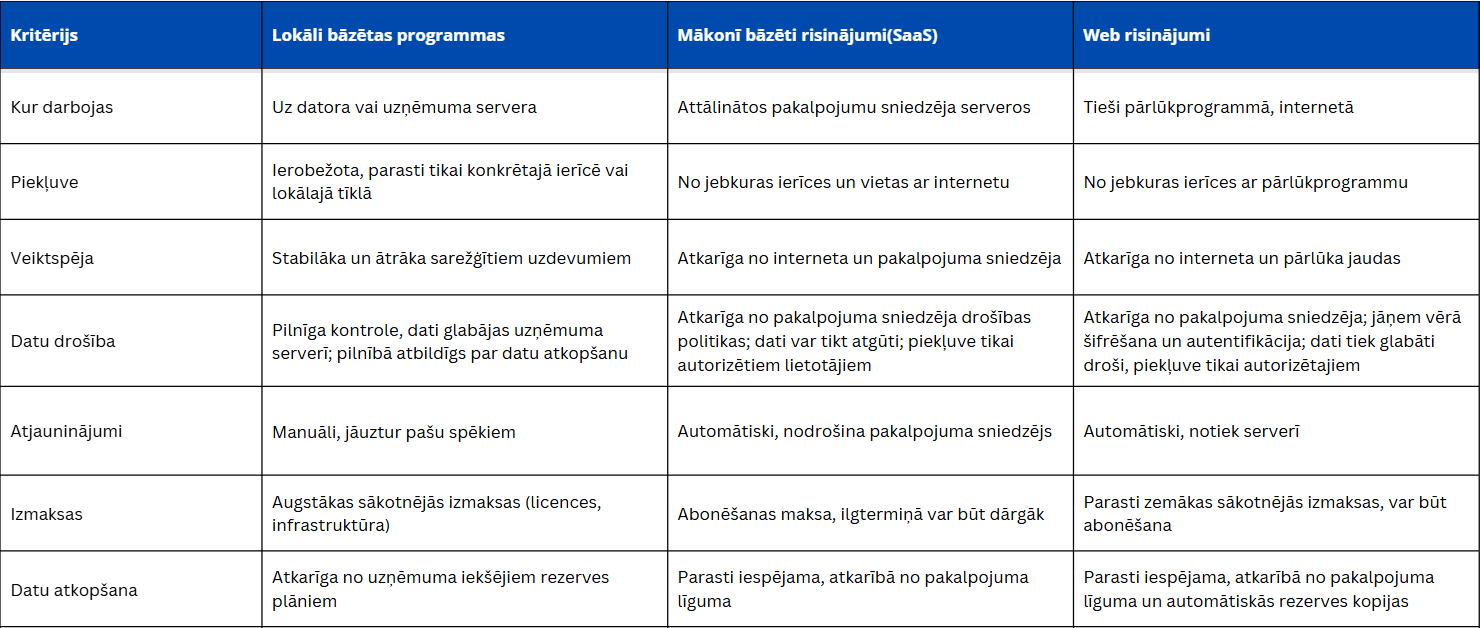
The final choice is often not just between one solution or another; in practice, companies increasingly combine multiple approaches, using on-premises software for specific tasks, cloud solutions for collaboration, and web solutions for daily operations. This hybrid approach allows you to leverage the strengths of each solution while avoiding their limitations. Therefore, the most important thing is not to find the "ideal" model, but to create a software environment that best supports your company's workflows, growth, and future needs.
Frequently asked questions
What is the main difference between on-premises, cloud-based, and web software for businesses?
The main difference lies in where the software runs and where data is processed. On-premises software runs on a specific computer or company server. Cloud-based solutions operate on remote servers, while web solutions are accessed via a browser without the need for installation.
Which software solution is the most secure for a business?
There is no single universally secure solution; security largely depends on how a system is managed and what measures are implemented. An on-premises solution provides full control over data and security, but it also entails full responsibility for backups and data recovery, as the company is responsible for its own storage. Cloud-based and web solutions often offer high-level security infrastructure and the ability to recover data in the event of loss; however, trust must be based on the service provider's policies, contracts, and certifications.
Storing data in the cloud or a web environment does not mean that data is publicly available or that government authorities can access it freely—access is regulated by the service provider, encryption, and user authentication. The most secure option is one where the company clearly understands where data is located, how it is protected, who has access to it, and how backups and recovery are ensured.
How do you choose the most suitable type of software for your company?
The choice should begin not with technology, but with the company's needs.
Key questions:
- where employees work (in the office or remotely);
- how critical data security is;
- how often the system needs to be updated;
- what IT resources are available.
If stability and control are required, choose an on-premises solution. If flexibility is important, choose the cloud. If simplicity is the priority, choose a web solution.